


To deepen consumer engagement with your brand, one key channel is in-app notifications. Knowing how to create, use, and monitor them can be valuable. They are a step beyond simple push messages. Brands can leverage in-app notifications to create value for customers within the product. In-app notifications also improve the experience across all consumer touchpoints.
This post will discuss how you can strategically utilize in-app notifications. Especially how to maximize the reach of your omnichannel campaigns. The in-app messaging helps to capture key customer insights without adversely impacting user experience. So read on to unearth the power of in-app notifications!
What Are In App Notifications?
In-app notifications are personalized, relevant, and engaging messages sent within a company’s app. They communicate key information to users while interacting with the product, such as critical updates, new feature announcements, and guidance to onboard users. In-app notifications are designed to be hyper-relevant and personalized for the user’s journey. Unlike emails and push notifications, they don’t require the user to opt-in and have zero risk of being lost in the spam folder or promotions tab. Moreover, in-app campaigns utilizing these notifications can significantly drive crucial metrics like activation rates, engagement and adoption, as well as conversions and revenue.
In-app notifications give users an easy way to interact with their apps in real time. They can provide helpful reminders, inform users of updates or changes within the app, and even prompt them to take a specific action or purchase something.
In marketing, in-app notifications can prompt users to purchase, visit particular app pages, or upgrade their subscription plans. This makes them helpful in driving engagement and increasing user loyalty.
Strategies for In App Notifications
Personalization
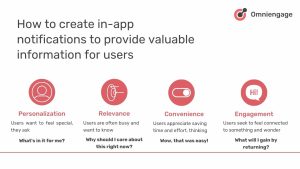
Personalization is the key to making users feel valued and understood. It’s about customizing the notification content to the user’s experience, preferences, or status within the app. Users want to feel special, they ask – What’s in it for me? In-app notifications that are personalized to their needs and interests can make them feel more connected to your brand.
Personalization starts by segmenting users based on their attributes and creating content that adapts to their user journeys. For example, Spotify allows users to pick their preferred artists using a top banner. Similarly, Dropbox sends notifications about running out of space and encourages users to upgrade.
Dive into your user data. To personalize their experience, focus on user-specific information, progress, or preferences to create individualized experiences.
- What are they doing in your app?
- What milestones are they hitting?
- What preferences are they communicating?
Create notifications that feel made for them.
Relevance
Relevance refers to providing timely, contextual information that aligns with the user’s current needs or the app’s latest features. Users are often busy and want to know – Why should I care about this right now?
Deliver information which is immediately useful or important to the user based on their current context within the app. For example, Airtable notifies existing users about new features with in-app notifications. On the other hand, Slack and Binance target new users by sending onboarding notifications and providing a guided tour.
Map out your user journey. Identify the key touchpoints. To create an effective context-aware notification system, consider aligning notifications with your app’s features and the user’s current stage in their journey. Use real-time data to make notifications timely and contextual.
- Where might they need a nudge or a hint?
- Develop a relevance score for each notification. If it doesn’t meet a certain threshold, don’t send it.
That’s your sweet spot for relevant notifications.
Convenience
Convenience involves making interactions easier, quicker, and more accessible for users. Users appreciate saving time and effort, thinking – Wow, that was easy!
Remember to simplify user actions, provide easy access to important features, and streamline interactions within the app. For example, many brands employ a simple in-app survey for quick feedback. Some fitness apps provide daily goal reminders for users. E-commerce apps utilize a non-intrusive floating action button for promotions.
Allow users to easily navigate to specific sections of the app. Provide key information upfront and allow users to access more details as needed. Additionally, offer users customization options for notification preferences to empower them with control over their app experience.
- How can we make this simpler?
- How can we include interactive elements in the notifications to reduce clicks?
You’re on the right track if a notification can save a click or two.
Engagement
Engagement involves stimulating user interaction, promoting feature adoption, and encouraging conversion actions. Users seek to feel connected to something thrilling and are asking, – What will I gain by returning?
Encourage users to explore your app by providing strong incentives. For example, e-commerce apps can offer special notifications based on seasonal deals, while fintech apps can use stories to convey their value propositions. A pinned slider titled ‘Invite for You’ for an event is a great way to increase engagement for SaaS. The bottom line is to give users compelling reasons to engage more with your app.
Challenges, streaks, or milestones prompt regular app usage. This can boost customer loyalty. Use FOMO (Fear of Missing Out) strategically by emphasizing time-sensitive offers or limited-time features.
- Think of engagement notifications as invitations, not demands.
You’re inviting users to discover more value, but you’re not always forcing feature promotions.
How Are In-App Notifications Different from Push Notifications?
In-app and push notifications are both used to send timely messages to users. However, there are several key differences between these two types of notifications. Push messages are received on the device’s home screen regardless of whether the user uses an app. On the other hand, an in-app notification is a message sent to the user while using an app. They appear as an alert within the app and can be customized to fit the look and feel of a particular app.
In-app notifications are much more effective at engaging users. They allow developers to control when their customers receive messages. Allowing them to improve their product. Another benefit is they can create timely, relevant training content that resonates with their users.
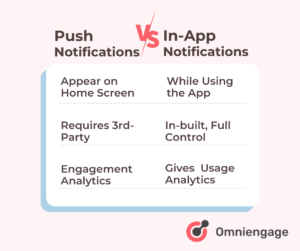
Push notifications rely on a third-party device to receive the message. In comparison, in-app notifications don’t require any external device. They can be delivered to the customers within seconds – making them more efficient.
In-app notitifications collect data related to an app’s usage patterns. This provides developers with better insights into how customers interact with their apps.
Understanding the different uses of in-app and push notifications will help you to increase conversions. The type that’s best for you to reach and engage your target audience will depend upon your use case.
Benefits of In-App Notifications for Product Growth
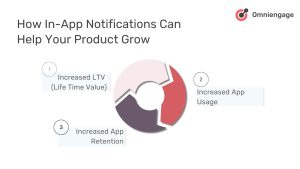
Increased Lifetime Value (LTV)
In-app notifications can significantly boost the lifetime value of users. A notification triggered by app events within the app amplifies your message. This inturn increases engagement and long term loyalty. You can guide users through high-value actions and features. Over time, the revenue generated from each users increases.
Quick Tips:
- Cross-sell and upsell products or services
- Promote premium features or subscription upgrades
- Offer personalized discounts or limited-time offers
- Highlight loyalty programs or rewards
- Showcase complementary products based on user behavior
- Announce new products or services relevant to the user’s interest.
Increased App Usage
In-app notifications can drive more frequent and meaningful interactions with your app. A key to improving your app usage is enabling users to spend more time in the app. What use is an investment adivsory app if it cannot give relevant information based on user event triggers? An app that utilizes app notifications correctly can get intergrated with users daily routines more easily.
Quick Tips:
- Onboard new users with guided tours
- Suggest additional features based on user behavior
- Guide users through the optimal experience speedily
- Prompt users to complete unfinished tasks or actions
- Highlight daily challenges or goals
- Remind users of unused features or credits
- Announce new content or updates
- Encourage social sharing or inviting friends
Increased App Retention
In-app notifications play a crucial role in keeping users engaged over the long term, reducing churn, and building lasting relationships. App retention can be improved by providing value and addressing pain points promptly.
Quick Tips:
- Gather NPS (Net Promoter Score) and discover advocates
- A/B test marketing messages for optimal engagement
- Prompt users to update the app for new features or bug fixes
- Prompt users to enable push notifications for external engagement
- Re-engage dormant users with personalized offers or content
- Celebrate user milestones or achievements
- Provide helpful tips and best practices
- Solicit feedback and show users their input is valued
- Send reminders for time-sensitive actions or events
Best Practices for In-App Notification Marketing
Segment and Personalize
A good marketing strategy requires segmenting users into different target groups. A segment is created to ensure the messaging resonates with the users. This encourages more engagement with your product or service. Segmenting should be on the user’s interests and needs. Then, relevant and personalized messages can be sent for more impact. This will increase the likelihood of customers responding to your campaigns.
Timely Messaging
Sending out notifications at the right time is essential. You might annoy your users if you send them messages too frequently. If you delay messages then your customers may miss out on important information. So strike a balance between timely messaging and not overwhelming users. To do this, consider when your target audience is active on their device. Find out their time zone and send notifications at optimal times in the day.
Develop an Engaging Copy and Appropriate CTAs
An engaging copy for your notifications that is clear, concise and direct improves engagement. A clear message gathers interest from users. Users should know exactly what action they should take next if they click through the notification. This avoids confusion.
Try including a call-to-action (CTA) which can guide helps guide users down the path towards conversion. A CTA should stand out from other elements of your notification message. A quick tip: using a colour that contrasts with the rest of the message copy is helpful.
A/B Test Different Versions
A/B testing different versions of your notifications ensures that you send out the most effective message. For example, test other subject lines, images, copy lengths, colors etc. Analyze user engagement data later to identify which version worked best for each segment or user group. Doing this regularly allows you to refine your design process and create better-performing campaigns.
7 Types of In-App Notifications with Examples
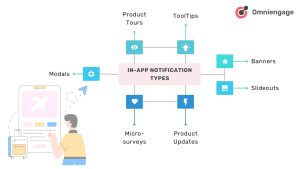
Product Tours
Start here to introduce new users to your app. The product tour notifications are designed for new downloads. This notification type guides users through features.
Use case: Onboarding new users or introducing a significant app redesign. Upon the first app launch, provide comprehensive onboarding including significant updates or new features for users from specific regions.

Segmentation Key:
- Customer actions that signal a new user – for example those who have just downloaded the app
- Existing users when introducing major new features or app redesigns
- Users in specific geographic locations for region-specific functionalities
Example: For a finance app, offer new users a product tour, guiding them through setting up their profile, linking accounts, and using key features. This uses customer action segmentation to provide a seamless onboarding experience.
ToolTips
Follow up with tooltips to guide users through specific features as they explore the app. This type of notification is a small, non-intrusive pop-up that provides brief explanations or hints.
Use case: During initial onboarding, educate new users about features or guide them through new or complex functionalities. The app should introduce new features based on user activity and when infrequent users return after a period of inactivity.

Segmentation Key:
- Existing users exploring new features or sections of the app
- For users that are segmented by app usage frequency, especially occasional or rare users who might need guidance
Example: For a productivity enhancement app, show tooltips to users who have just cleared their first level, motivating them to use more advanced features or power-ups. Use customer action segmentation to provide timely, relevant guidance.
Banners
Use banners to highlight ongoing promotions or features. This type of app notification is a horizontal strip, typically at the top or bottom of the screen.
Use case: Persistent notifications used for ongoing promotions, system status updates, or other relevant information. They can be designed for events or promotions in specific locations. They can also highlight new features to encourage occasional users to become regular users. During specific timeframes, they can optimize usage, such as the first month after download or for anniversary celebrations.
Segmentation Key:
- Users segmented by geographic location for local promotions or events
- Users categorized by app usage frequency
- Users segmented by timeline, such as recent downloaders or long-time users
Example: For a food delivery app, show a banner to users in New York City about a weekend restaurant festival. This uses geographic segmentation to provide relevant, localized information to users.
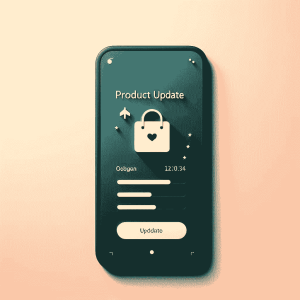
Product Updates
Introduce new features or improvements to keep users engaged. Depending on their urgency, this type of notification can be modals, banners, or slideouts.
Use case: Announcing new features, improvements, or changes to the app. Especially during key user milestones, like one month after download, we should immediately highlight new features or improvements to re-engage infrequent users by showcasing enhanced functionalities.
Segmentation Key:
- Users segmented based on the frequency of app use
- Users categorized by timeline-based segments, such as recent downloaders or long-time users
- Users segmented by customer actions who might benefit from new features
Example: For a fitness app, show a product update notification to users who work out 3-4 times a week, introducing a new feature for creating custom workout plans. This uses the frequency of app use segmentation to target engaged users who are likely to appreciate and use the new feature.
Slideouts
Offer personalized recommendations or re-engagement prompts. These notifications are panels that slide in from the side of the screen.
Use case: Contextual information, related content, or quick actions can be sent. When a user returns to the app after leaving items in their cart, they can be nudged with personalized product recommendations or purchase help. It can also be used to introduce complementary features to engage infrequent users.

Segmentation Key:
- Users segmented by customer inactions, such as abandoned carts
- Users categorized by buying behaviours for personalized recommendations
- Users segmented by app usage frequency, particularly to re-engage seldom users
Example: For a productivity app, show a slideout to users who started a project but left it untouched for a week. This will remind them of their progress and encourage them to continue. This slide-out notification re-engages inactive customers.
Microsurveys
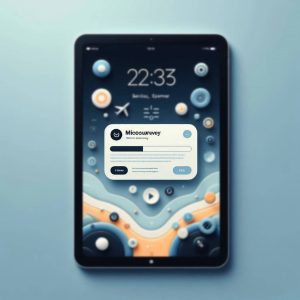
Gather feedback after users have had time to experience the app. This type of in-app notification features short, quick surveys, often presented as modals or slideouts.
Use case: Gathering quick feedback, user preferences, or satisfaction ratings. They are used for gathering ongoing feedback from frequent users at regular intervals, especially when collecting initial impressions immediately after a user interacts with a new feature. They can also guide significant in-app purchases to gauge satisfaction.
Segmentation Key:
- Users segmented by buying behaviors to gather feedback on purchases
- Users categorized by frequency of app use, particularly loyal or frequent users
- Users segmented by customer actions, such as those who have just used a new feature
Example: For a streaming app, show a microsurvey to users who have just finished watching a new release, asking for their rating and feedback. This uses customer action segmentation to gather timely and relevant user opinions.
Modals
Use for high-impact messages or exclusive offers. This type of in-app notification is full-screen or centre-screen overlays that demand immediate attention.
Use case: Important announcements, critical updates, or actions requiring user input. When users reach significant milestones, such as $100 in in-app purchases, they need to be notified for immediate attention for critical information or when significant user action is needed. Time-sensitive offers to high-value customers should also be communicated. Moreover, modals can be used for updating users on critical actions that are required, such as accepting new terms of service and re-engaging users who have shown interest but haven’t completed a desired action.
Segmentation Key:
- Users segmented by buying behaviors, especially high-value customers
- Users categorized by specific customer actions or inactions
- Geographically segmented users for location-specific announcements
Example: For an e-commerce app, show a modal to users who have spent over $500 in the last month, offering them exclusive access to a VIP sale. This utilizes buying behavior segmentation to reward and further engage high-value customers.
Conclusion
In-app notifications give app owners the power to reach their users and drive engagement. They are best used for user retention and building a connection with users. Features like personalization and targeting can be tailored to ensure the right people hear your message.
Reaching users within the app for engagement and analytics is possible with in-app notifications. Once you can strike the right balance between promotional messages and valuable content you are on the right path. Relevant, timely, and valuable notifications will increase the user experience. This will overall have a good impact on conversions in your marketing strategy. Sign Up for OmniEngage.co to create your first workflow.